
Download PDF Compressor Server – PDF compressor, file compression, PDF optimization, PDF tool, document management, LAN, Windows, automated workflow
Overview
PDF Compressor Server is a specialized Windows application engineered to streamline document management within local area network (LAN) environments. Designed for users who frequently handle large volumes of PDF files, the software addresses common pain points such as excessive storage consumption and manual file processing. By automatically detecting and compressing PDFs as they are added to designated folders, it eliminates the need for repetitive manual intervention, significantly enhancing workflow efficiency. The tool is particularly beneficial for teams or departments that rely on shared drives, such as legal firms, administrative offices, or content publishing units, where consistent document handling is essential.
Its core function revolves around automated compression triggered by file presence in monitored directories. Whether the PDFs are scanned images or text-based documents, the application adapts its compression strategy accordingly, ensuring optimal results across diverse content types. The software supports recursive folder scanning, allowing it to process files in subdirectories while preserving the original folder hierarchy in the output. This structural integrity simplifies file retrieval and maintains organized workflows. Although the developer did not provide additional technical details about the underlying compression algorithms, the application’s focus on automation and network integration suggests a robust backend designed for reliability in enterprise-like settings.
Given its niche purpose, PDF Compressor Server occupies a distinct space in the productivity software ecosystem. While many tools offer PDF compression, few are built specifically for LAN-based, continuous monitoring and automated processing. This makes it a valuable asset for organizations seeking to reduce storage overhead and standardize document handling across multiple users. Its targeted functionality positions it as a utility rather than a general-purpose app, appealing to users who prioritize efficiency, consistency, and scalability in document workflows.
Key Features & Functionality
- Automatic Compression: The application continuously monitors predefined folders for new PDF files. Upon detection, compression is initiated immediately, reducing manual oversight and ensuring timely processing.
- Comprehensive File Support: Designed to handle both scanned image-based PDFs and text-based PDFs, enabling consistent compression across different document types without requiring user intervention.
- Customizable Output Settings: Users can define custom suffixes for output filenames and adjust DPI settings and compression quality ratios to balance file size and visual fidelity.
- Multi-Folder Monitoring: Supports monitoring of multiple shared folders simultaneously, including sub-folders, allowing for broad coverage across complex network structures.
- Folder Structure Preservation: Maintains the original directory hierarchy in the output location, simplifying file organization and retrieval.
- Pause and Resume Functionality: Allows users to temporarily halt monitoring without losing progress, providing control during system maintenance or high-load periods.
For example, in a shared departmental drive, a user can configure the tool to monitor a "Scanned Documents" folder. As soon as a new PDF is uploaded, the system compresses it and saves the optimized version in a "Compressed" subfolder, preserving the original folder path. This setup ensures that all incoming files are processed consistently, reducing clutter and saving disk space. The ability to fine-tune compression quality enables users to tailor output for archival purposes or quick sharing, depending on their needs. These features collectively support a seamless, low-effort workflow ideal for teams managing high-throughput document pipelines.
Interface, UX & Performance
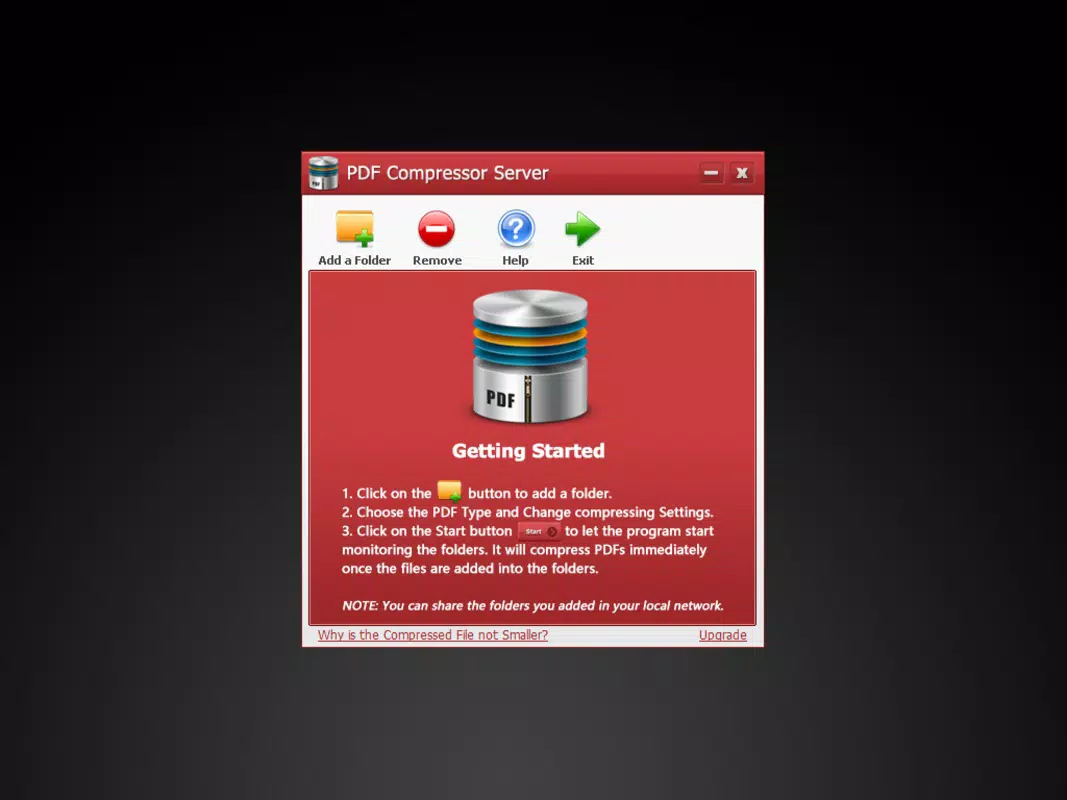
PDF Compressor Server presents a clean, functional interface tailored for system administrators and power users rather than casual consumers. The layout prioritizes configuration over visual flair, with clearly labeled sections for folder selection, compression settings, and monitoring controls. Navigation is straightforward, relying on a tabbed or panel-based structure that allows users to manage multiple monitoring tasks efficiently. The application avoids clutter by grouping related functions, such as output naming and quality settings, into dedicated panels.
Although the developer did not list formal performance metrics, the application is designed to run in the background with minimal resource consumption. It operates silently, monitoring file systems without interfering with other processes. Responsiveness appears to be consistent across different device categories, though specific benchmarks were not disclosed. Stability is implied by the inclusion of pause/resume functionality and the absence of reported crashes in public documentation. The application maintains a low footprint, with a file size of 24.7 MB, suggesting efficient code architecture.
Users can expect smooth operation during normal usage, especially in environments with stable network connectivity and sufficient disk I/O. The application’s ability to process files in real-time as they are added indicates strong integration with Windows file system events. While no real-time performance statistics were provided, the design suggests it is optimized for continuous background operation without causing system lag.
Platform Compatibility & Technical Requirements
PDF Compressor Server is designed exclusively for the Windows operating system. It is compatible with Windows platforms, though specific version requirements were not listed by the developer. The application has a file size of 24.7 MB, which is relatively compact for a utility with automation and monitoring capabilities. This size suggests a lean, focused application without unnecessary bloat.
Although the developer did not specify minimum OS requirements, the software is likely intended for modern Windows versions such as Windows 10 or Windows 11. It is not available on macOS, Linux, Android, or iOS. Users should ensure their system meets standard Windows requirements for running background services and accessing network shares. The lack of detailed technical specifications means compatibility with older Windows versions remains uncertain.
Pros and Cons
Pros
- Automated compression reduces manual workload in shared environments.
- Supports both scanned and text-based PDFs for versatile use cases.
- Preserves folder structure in output, improving file organization.
- Customizable compression settings allow for fine-tuned output quality.
- Pause and resume functionality enhances control during maintenance.
Cons
- Exclusive to Windows; no support for macOS, Linux, or mobile platforms.
- Price point of $39.95 may be high for individual users.
- No public documentation on compression algorithms or performance benchmarks.
- Requires configuration for optimal use; not fully plug-and-play.
- Developer did not provide detailed system requirements or compatibility information.
FAQ
Is PDF Compressor Server secure to use on a network?
The application operates within the user’s defined folder permissions and does not transmit files outside the local network unless explicitly configured. Security depends on proper network and file access settings.
Can I use PDF Compressor Server on multiple computers?
Yes, the application can be installed on multiple Windows machines, provided each installation is licensed appropriately.
Does the software support automatic updates?
The developer did not specify whether automatic updates are available. Users should check the official website for update notifications.
Is there a free version or trial available?
Information about a trial or free version was not provided. The application is sold at a fixed price of $39.95.
What happens if the compression process is interrupted?
Due to the pause and resume functionality, ongoing processes can be paused and resumed without data loss. However, incomplete files may require manual review.
Final Thoughts
PDF Compressor Server delivers a focused, powerful solution for organizations managing high volumes of PDFs across shared network drives. Its ability to automate compression without user input makes it a standout tool in the document management space. While its Windows-only availability and upfront cost may limit appeal for casual users, professionals in legal, administrative, or publishing fields will find significant value in its automation and customization features.
For teams seeking to reduce storage costs, standardize file handling, and minimize manual effort, this application offers a reliable, efficient workflow. The preservation of folder structure and support for both image and text PDFs ensure broad compatibility across real-world scenarios. Though it lacks mobile or cross-platform support, its niche design ensures high performance within its intended environment.
Download PDF Compressor Server now


